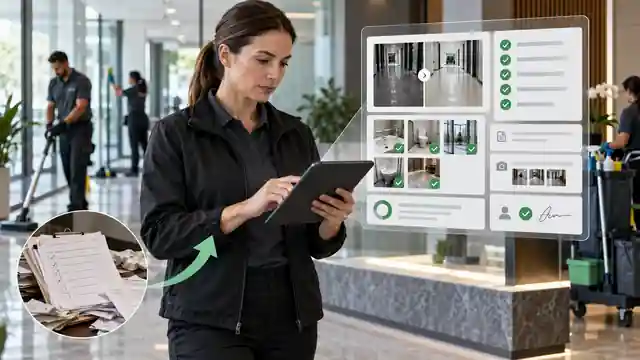
Cleaning job report software solves a simple operational problem: the work happens on site, but the evidence of that work often ends up everywhere. A checklist may be on paper. Photos may be on a cleaner’s phone. Notes may sit in WhatsApp, SMS or email. A customer signature may be somewhere else again.
That fragmented setup works while a business is small and the owner remembers every job. It becomes harder when multiple cleaners, supervisors, properties and recurring contracts are involved. The problem is not merely administrative inconvenience. It becomes difficult to answer basic questions later: What was actually completed? Which photos belong to this visit? Was an issue reported? Did the customer acknowledge the job? Can we produce a clean record without reconstructing it manually?
A better system creates one closeout workflow: job details → checklist → photos → notes → acknowledgement → customer-ready report.
Do not treat photos, checklists and notes as separate evidence. Tie them to one job record so the business can show what happened without rebuilding the story later.
Why paper job sheets become a problem
Paper itself is not automatically bad. A printed checklist can be quick and familiar. The problem appears when the paper form is expected to become the permanent operational record.
A cleaning supervisor may need to know whether a restroom checklist was completed, which issue was found in the lobby, whether a broken fixture was reported, and whether the customer approved an extra task. If those details sit across a paper sheet, three photos and a text message, somebody has to join them together manually.
That creates four common failure points:
- The record is incomplete. The checklist exists but the supporting photo is missing.
- The evidence loses context. A photo exists but nobody can confidently match it to the right job or task later.
- The office has to chase the field team. Someone calls or messages the cleaner to ask what happened.
- The customer receives an inconsistent handoff. One client receives photos, another receives a short email, and another receives nothing unless they ask.
Current cleaning proof-of-work products increasingly organize checklists, job details, photos and completion reports into the same visit record rather than treating a camera roll as the report. That direction matches the practical problem cleaning businesses are trying to solve. ProofClean, Photo2Report and other current tools all emphasize structured evidence rather than loose photo sharing.
Why scattered job photos are weak evidence
A photo can be valuable evidence, but only when the viewer knows what it represents.
Imagine a cleaner sends eight photos into a team chat after finishing an office clean. Two weeks later a property manager questions whether a particular kitchen area was serviced. The business can search the chat and find photos, but it may still need to answer:
- Which site was this?
- Which date and service visit?
- Was the photo taken before or after the work?
- Which checklist item did it support?
- Was there an issue noted at the time?
- Was this image intended for the customer or only for internal use?
That is why a photo library is not the same as a job-reporting system. The useful record connects the image to the job, service date, site, team, task and status.
What a good cleaning job report should contain
A useful report does not need to be long. It needs to make the visit understandable.
| Report element | What it should show | Why it matters |
|---|---|---|
| Job identity | Customer, site, service date and job reference. | Prevents evidence from becoming detached from the correct visit. |
| Assigned team | Cleaner, crew or responsible technician. | Creates a clear operational record of who completed the visit. |
| Service checklist | The tasks or areas that were expected and their completion status. | Connects the report to the agreed service scope. |
| Photos | Relevant before, after, completion or issue photos. | Provides visual context where it adds real evidence. |
| Notes | Factual observations, exceptions, access problems or follow-up items. | Explains anything the checklist alone cannot communicate. |
| Acknowledgement | Customer or site acknowledgement/sign-off where the workflow requires it. | Records the handoff at the end of the job. |
| Final report | A clean customer-facing summary of the completed visit. | Gives the client something useful to retain rather than raw field data. |
Cleaning job completion report: a practical checklist
For many cleaning companies, the easiest way to improve reporting is to standardize the closeout before buying more software. The following checklist can be used as the basis of a digital workflow.
This approach also captures the search intent behind cleaning job completion report without creating a second near-duplicate article. The checklist belongs naturally inside the larger reporting workflow.
What cleaning job report software should do
The software should make the closeout easier than the paper process it replaces. If employees need several apps, repeated logins and long forms just to document a straightforward cleaning visit, adoption will fail.
1. Keep the checklist tied to the job
The cleaner should not have to remember which checklist applies. The job record should present the relevant tasks or areas and keep the completed items attached to that visit.
2. Make photo capture part of the workflow
Photos should be added while the cleaner is inside the job record. This reduces the chance that the office later has to work out which site a photo belongs to.
Not every task needs a photo. Evidence should be intentional. A move-out clean, property turnover, stain treatment or client-reported issue may benefit from clear before-and-after documentation. A routine recurring visit may need only selected completion or exception photos.
3. Separate completion from issues
A useful system should not force every note into one large text field. Completed work and unresolved issues are different pieces of information. If access was blocked, a fixture was already damaged, consumables were unavailable or a task could not be completed, that should remain visible.
4. Support acknowledgement or sign-off
Some cleaning jobs finish while no customer representative is present. Others involve a direct handoff. Where acknowledgement is appropriate, it should be attached to the same job record rather than stored separately.
5. Produce a report the customer can actually read
The field record and the customer report are not necessarily the same thing. Internal notes may contain operational details that do not belong in the customer handoff. The software should turn the approved job information into a concise, professional output.
Paper workflow vs digital closeout
| Stage | Paper / scattered workflow | Structured digital workflow |
|---|---|---|
| Job starts | Printed sheet or instructions in messages. | Cleaner opens the correct job record. |
| Tasks | Ticks boxes on paper or relies on memory. | Completes the job-specific checklist. |
| Photos | Stored in phone camera roll or sent into chat. | Attached directly to the correct job. |
| Issues | Texted, called in or written in margins. | Recorded as structured notes inside the visit. |
| Handoff | Paper signature, informal confirmation or none. | Acknowledgement/sign-off attached to the job where appropriate. |
| Customer report | Office manually rebuilds an email or document. | Approved job data becomes a consistent report. |
| Later lookup | Search paper files, chats and photo galleries. | Open the historical job record. |
A simple migration plan for a cleaning company
Moving away from paper does not require digitizing every business process at once. The safest approach is to replace one complete workflow.
- Collect your current paperwork. Gather the job sheet, checklist, photo instructions, completion email and any sign-off process currently used.
- Remove duplicate fields. If the same customer, address or job number is written in several places, decide where it should live once.
- Define mandatory closeout items. Decide what must be completed before a cleaner can finish the job.
- Decide when photos are required. Avoid making staff take meaningless photos simply because the software allows it.
- Create an exception path. Define what happens when a task cannot be completed or an issue is discovered.
- Define the customer-facing output. Decide what the client should see and what should remain internal.
- Test with one cleaner or one site. Run real jobs and identify friction before expanding to the whole company.
- Review reports with the office team. Make sure the digital record actually removes follow-up work instead of shifting it somewhere else.
If the digital process takes longer than the paper process for a normal job, simplify it before rolling it out. The purpose is to create a better record with less chasing—not to give cleaners more administration.
Where FieldReport fits
FieldReport is NIR.Systems’ focused job-documentation product for field teams. It is designed around a narrow workflow: open the job, complete the checklist and notes, add relevant before-and-after photos, capture acknowledgement or sign-off, and create a customer-facing proof-of-work report.
For cleaning companies, that makes it relevant when the operational problem is not scheduling every cleaner or running the entire back office. The problem is specifically documenting what happened on site and turning it into a consistent record.
That distinction is important. FieldReport is not positioned as a replacement for payroll, route planning, full CRM, inventory, accounting or every function inside a large field-service platform. A cleaning company can continue using other systems for those jobs and use a focused reporting tool where proof of completion is the gap.
The broader verified search terms in NIR’s keyword research—field report software and job reporting software—support that same commercial intent. The cleaning-specific page narrows the workflow to the language and evidence a cleaning business actually needs.
How reporting can reduce avoidable disputes
No report can guarantee that a customer will never complain, and documentation does not prove something that was never recorded. What it can do is make the conversation more concrete.
Instead of relying on memory, the business can review the service checklist, photos, notes and acknowledged job record. If an issue was recorded at the time, it is visible. If an area was outside the agreed scope, the job record can help show that distinction. If work needs to be corrected, the team has a clearer starting point.
For recurring commercial work, consistency matters even more. A single report is useful; a history of structured reports creates a service record that can be reviewed by supervisors and clients over time.
When you may need more than job report software
A focused reporting tool is not the right answer to every cleaning-company problem. You may need a broader platform when the main requirement is:
- staff scheduling and shift management,
- route optimization,
- time and attendance across large teams,
- payroll,
- inventory and consumables management,
- automated invoicing and payments,
- CRM and sales pipeline management, or
- enterprise multi-site quality auditing with complex corrective-action workflows.
The right software boundary depends on the problem. If the business already has scheduling and accounting under control but still closes jobs with paper, chats and loose photos, a focused reporting workflow may be the more practical change.
Frequently asked questions
What should a cleaning job completion report include?
At minimum: customer and site details, service date, assigned team, completed checklist, relevant photos, factual notes, issues or exceptions, and acknowledgement/sign-off where appropriate.
Why are job photos alone not enough?
Photos are stronger when the business can identify the customer, site, date, task and job status they belong to. A camera roll or chat thread can lose that context over time.
Does cleaning job report software replace scheduling or accounting software?
Not necessarily. A focused reporting product can document completed work while scheduling, payroll, invoicing, CRM or accounting remain in separate systems.
How can a cleaning company move from paper job sheets to digital reports?
Start with one complete closeout process: job identity, checklist, photos, notes, exceptions, acknowledgement and the final customer report. Pilot it with a small number of real jobs before expanding.
Turn completed cleaning work into a clear job record.
If your cleaners already use checklists, take job photos and send completion notes, FieldReport gives those steps one structured place and turns them into customer-ready proof of work.