
Construction AI software is becoming a serious software-buying category rather than a novelty feature. Current platforms can search drawings and specifications, assist with RFIs and submittals, organise site records, analyse project information and automate parts of administrative workflows. But the products differ significantly in what data they understand, what actions they can take and how much control the builder retains.
That makes evaluation more important than the AI label itself. A polished chat interface can look impressive in a demonstration while still being a poor fit for a working construction company. Builders need to test the system against the information, approvals, risks and operating practices that exist on real projects.
If you first need the broader foundation, read What Is Construction AI?. If you want workflow examples for a head contractor, see How General Contractors Can Use Construction AI in Real Workflows. This guide focuses on the next question: what should you look for before selecting construction AI software?
Evaluate the workflow, data and control model—not the demo prompt. The best construction AI product is the one that can work safely and usefully inside the way your projects actually operate.
1. Start with the construction workflow, not the AI feature list
Before comparing products, define the problem you want to solve. “We want AI” is not a software requirement. “Our project engineers spend too much time searching specifications and assembling RFIs” is.
Common workflows that construction AI may assist with include:
- drawing and specification search,
- RFI drafting and routing,
- submittal-log preparation and review support,
- site diaries and daily reporting,
- bid and subcontractor proposal review,
- contract and scope comparison,
- progress-photo classification,
- programme and look-ahead analysis,
- change-event documentation, and
- handover and closeout organisation.
Current construction platforms are moving in exactly this direction. Procore’s current AI offering includes deep search, RFI, submittal review, site diary and contract-review agents, while Autodesk’s construction AI offering includes document management, submittal support, photo metadata, risk insights and assistant capabilities. The important point is not which vendor has the longest feature list. It is that construction AI is moving toward embedded workflows rather than standalone generic chat.
2. Check whether it understands the project information you actually use
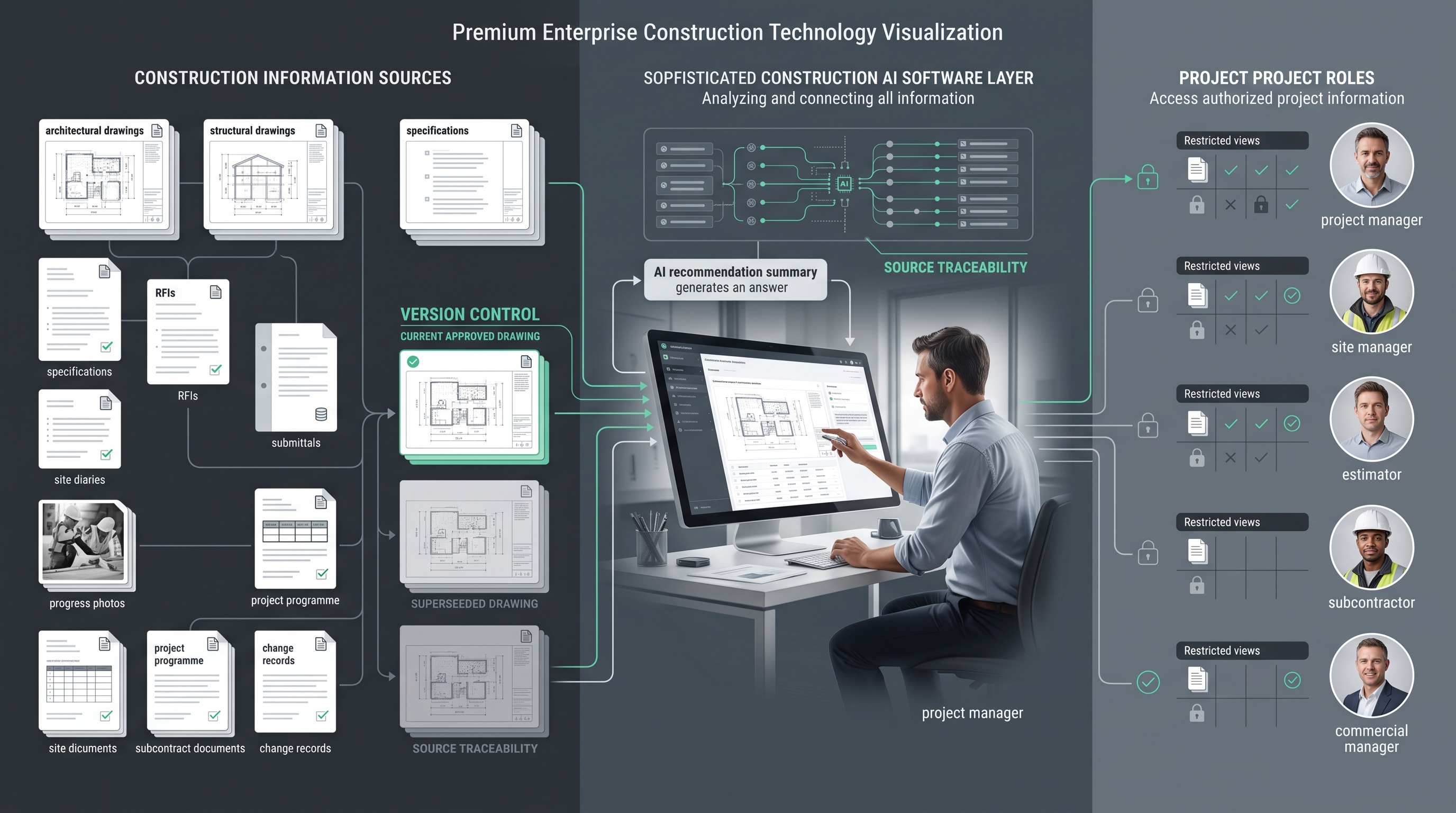
Construction information is unusually fragmented. The answer to one project question may depend on a drawing, a specification section, an RFI response, a submittal, a photo, a programme activity and a subcontract clause.
Ask the vendor exactly which data sources and file types the system can work with:
Then go one step further: test whether the software understands relationships between those sources. Finding the phrase “fire door” in a specification is basic search. Connecting a current drawing detail, the relevant specification section and a later RFI response is much closer to useful project intelligence.
3. Source traceability should be a requirement
Construction teams should be able to verify important AI outputs. That means the software should show the underlying source file, record or section rather than simply return a fluent answer.
Procore, for example, currently describes source-file citations and visual previews as part of its AI control model. That is the right buying question regardless of vendor: can a user see why the system reached this answer?
A builder evaluating AI should test:
- whether answers include source references,
- whether a user can open the source quickly,
- whether the system identifies the document revision,
- whether superseded information can be excluded or clearly labelled, and
- whether generated drafts show which project records were used.
Without traceability, teams may spend as much time checking the AI as they previously spent finding the answer.
4. Version awareness matters more in construction than in ordinary office AI
A construction answer can be technically accurate and still be wrong for the project if it comes from an outdated drawing or superseded specification.
Ask how the system handles revisions and document status. Does it automatically prefer the current approved revision? Can administrators control which folders or records are authoritative? What happens if two sources conflict? Can the user see when the answer is based on older information?
This is a critical distinction between a general-purpose AI assistant and software designed around construction records.
5. Permissions need to follow the project structure
Not everyone on a project should have access to every record. Commercial information, contracts, tender comparisons, personnel data, owner correspondence and internal risk notes can require restricted access.
Good construction AI software should not create a new permission bypass. Ideally, the AI respects the same role-based access model as the underlying project system. Procore states that its AI follows existing project permissions so users only see information they are already authorised to access.
During procurement, ask:
- Does the AI inherit existing project permissions?
- Can administrators restrict particular projects, folders or data classes?
- Can users see what information an agent accessed?
- Are AI actions logged?
- Can automated actions be restricted by role?
6. Human approval must be designed into high-consequence workflows
Construction AI can prepare, summarise, compare and flag. That does not mean it should independently approve every outcome.
| AI can assist | Human should normally retain accountable approval |
|---|---|
| Draft an RFI from site inputs | Issue the final RFI |
| Compare submittal information with specifications | Technical acceptance or design approval |
| Summarise a contract clause | Adopt a contractual or legal position |
| Flag programme risks | Commit to a revised programme |
| Identify possible scope gaps | Approve commercial pricing or change orders |
| Prepare a site diary draft | Confirm the official project record |
| Highlight a possible safety issue | Make the site-safety decision |
Australia’s current guidance for responsible AI adoption emphasises governance, risk management and accountability. Cyber.gov.au’s 2026 guidance on agentic AI also recommends incremental adoption, strict privilege controls, continuous monitoring and human oversight. Those principles are directly relevant when software can take actions rather than merely answer questions.
7. Evaluate privacy and data use before uploading project records
Australian builders may hold personal information in project systems: worker details, contact information, photographs, correspondence, incident records and other identifiable data. That means privacy cannot be treated as an IT footnote.
The Office of the Australian Information Commissioner recommends due diligence when organisations adopt commercially available AI products. Its guidance specifically calls out intended use, human oversight, privacy and security risks, and who can access personal information entered into or generated by the AI product.
Ask the vendor:
- Is customer project data used to train shared models?
- Which subprocessors or external model providers receive data?
- Where is project data stored and processed?
- What retention and deletion controls are available?
- Can administrators prevent sensitive information from entering certain workflows?
- How are photos, audio and video handled?
- What security certifications or independent assurance does the provider maintain?
The right answer depends on your organisation and contractual obligations. The key is to investigate before connecting live project information.
8. Integration is often more important than model sophistication
A powerful AI product can still fail if users must manually export documents, paste information between systems and maintain a second copy of project data.
Builders should determine where the AI sits in the operating environment:
- Does it work inside the existing construction platform?
- Can it connect to document storage?
- Can it read and write authorised project records?
- Does it preserve links back to the system of record?
- Can it integrate with estimating, scheduling, finance or field systems where required?
- Does it create duplicate records that someone must later reconcile?
Embedded AI may reduce change-management friction because the team stays inside familiar workflows. A separate specialist tool may still be valuable where it solves a narrower problem better. The correct architecture depends on the task.
9. Test how configurable the software is to your way of building
Builders do not all use the same terminology, approval pathways, cost structures or standard operating procedures. A system that works well in one contractor’s environment may need configuration in another.
Look for the ability to define:
- company-specific workflows,
- standard templates and required fields,
- approval stages,
- project roles and permissions,
- internal terminology,
- risk thresholds,
- source repositories, and
- rules for when AI must stop and request review.
For an Australian builder, local terminology matters as well. A workflow framed around site diaries, head contractors, subcontractors, variations, programmes and handover documentation should not require teams to translate every process from another market’s terminology.
10. Demand a measurable business case
Construction AI should ultimately improve a business process. Before rollout, record a baseline and decide what will count as success.
| Workflow | Possible measure |
|---|---|
| Document search | Average time to locate and verify project information |
| RFIs | Drafting time, completeness and rework before issue |
| Submittals | Log-building time, missing-item detection and review turnaround |
| Site diaries | Administration time and record completeness |
| Tender review | Time to compare scope, exclusions and clarifications |
| Closeout | Time spent identifying missing handover records |
A high number of AI prompts is not ROI. A defensible business case should show that the workflow became faster, more complete, easier to audit or less dependent on repeated administrative effort.
A practical construction AI workflow for builders
The safest way to implement construction AI is to use a controlled sequence rather than connecting every project system at once.
- Choose one workflow. Start with a repeatable information-heavy task such as specification search, RFI preparation or site-diary drafting.
- Define the source of truth. Identify which drawings, specifications, RFIs, records or systems the AI is allowed to use.
- Define permissions. Decide which roles may access the workflow and what project information each role can see.
- Define the AI task. Be precise: search, compare, draft, classify, flag or summarise.
- Define the approval point. Identify the person responsible for checking and releasing the output.
- Test against completed projects. Use known historical records so the team can measure accuracy and failure modes.
- Run a controlled live pilot. Start with one project or team and keep the previous process available.
- Measure the result. Compare time, completeness and review effort against the old workflow.
- Expand only after the first workflow works. Move into adjacent tasks instead of attempting an enterprise-wide AI transformation immediately.
If the team cannot explain what data the AI used, what it produced, who checked it and what improved, the workflow is not ready to scale.
Construction AI software evaluation checklist
Where NIR.Systems fits
NIR.Systems approaches AI as a specialist workflow problem rather than a single generic assistant. The objective is to define the domain, source information, output structure and human-control point around a specific business task.
For builders, that means starting with the process that creates the most repeated information work: project search, reporting, document review, structured analysis or another clearly bounded workflow. A specialist AI or custom system can then be designed around that operating requirement rather than forcing the business into a generic chatbot.
Construction AI is part of the broader vertical-AI opportunity we are researching and designing around. For current NIR capabilities, explore Specialist AI and Custom Systems. We do not present a dedicated Construction AI product page here as though a packaged product is already live.
Frequently asked questions
What should builders look for in construction AI software?
Prioritise workflow fit, project-data support, source traceability, revision awareness, permissions, human review, integrations, security and measurable operational value.
Should construction AI replace project managers or site managers?
No. It is better treated as an assistance and workflow layer. High-consequence decisions involving safety, contracts, final pricing, design, programme commitments and approvals should retain accountable human review.
Can construction AI work with drawings, specifications and RFIs?
Some current construction AI products can search or reason across drawings, specifications, RFIs, submittals, photos and other project records. Buyers should verify the exact formats, revisions and sources supported by the product they are evaluating.
How should an Australian builder assess AI data privacy?
Perform due diligence on who can access project and personal information, whether data is used for model training, how permissions work, where information is processed and stored, and how human oversight is embedded. Australian privacy obligations may apply where personal information is involved.
Sources and further reading
- Procore Australia — AI construction software
- Autodesk Australia — AI for Construction
- OAIC — Guidance on privacy and commercially available AI products
- Cyber.gov.au — Careful adoption of agentic AI services
- Australian Government — Responsible AI adoption guidance
Choose the workflow first. Then choose the AI.
If your construction team has a repetitive information workflow that needs a specialist system rather than another generic chatbot, explore NIR.Systems’ specialist AI and custom-system approach.