
Real estate CRM software sits at the center of one of the hardest operational problems in an agency: relationships develop over weeks, months or years, while the information needed to manage them is scattered across portal leads, phone calls, text messages, email, calendars, showing notes, spreadsheets and personal memory.
That is why CRM remains a mainstream real estate technology rather than a niche add-on. The National Association of REALTORS® reported in its September 2026 Technology Report that 46% of agents use CRM technology. The same report found that 81% adopt technology to save time and 71% do so to improve the client experience. A year earlier, NAR’s 2025 survey ranked CRM second only to social media among technologies generating the highest number of quality leads.
The useful question therefore is not whether a CRM can hold contacts. Almost any database can do that. The real question is whether the CRM matches how agents actually work.
For every active lead or client, an agent should be able to answer three questions quickly: Who is this person? What happened last? What should happen next?
1. Start with one complete contact timeline
The foundation of a good real estate CRM is a useful contact record, not a complicated dashboard.
For each buyer, seller, landlord, investor, past client or referral partner, the record should bring together:
- name and contact details,
- lead source,
- assigned agent,
- relationship type,
- property interests or property owned,
- budget or likely price range,
- location preferences,
- communication history,
- viewings and meetings,
- offers or transaction history,
- notes and important context, and
- the next scheduled action.
The timeline matters because agents should not have to search email, text messages and handwritten notes before returning a call.
2. Capture leads automatically, but keep the source visible
A real estate CRM should be able to receive leads from the channels the business already uses. Depending on the brokerage, that can include:
- the agency website,
- listing portals,
- paid advertising,
- social media forms,
- open houses,
- phone enquiries,
- referrals, and
- manual agent entry.
Each lead should retain its original source. That gives the brokerage a way to compare not just how many leads a channel produces, but whether those leads progress into appointments, signed clients and closed transactions.
Real-estate-specific CRM vendors increasingly emphasize this centralization. Follow Up Boss, for example, describes routing leads from more than 200 sources into one system and distributing them according to rules such as geography, listing ownership or team availability.
3. Make speed-to-lead operational, not theoretical
A lead arriving in the CRM is only useful if somebody owns the next action.
A focused workflow should be able to:
For teams, lead distribution should match the operating model. Some brokerages want round-robin distribution. Others route by ZIP code, property type, price band, language, listing agent or team. The CRM should make those rules visible rather than hiding them inside a black box.
4. Use separate pipelines for buyers and sellers
One generic “sales pipeline” is usually too crude for real estate because buyer and seller journeys are different.
A buyer pipeline might look like:
New lead → Contacted → Qualified → Search active → Viewings → Offer submitted → Under contract → Closed → Past client
A seller pipeline might look like:
New enquiry → Contacted → Valuation/consultation → Follow-up → Listing agreement → Property live → Offer accepted → Under contract → Closed → Past client
The exact labels are less important than consistency. Every agent should understand what each stage means and what action moves a contact forward.
5. Follow-up should be task-driven, not memory-driven
A CRM becomes valuable when it prevents good opportunities from disappearing simply because an agent became busy.
Useful follow-up tools include:
- next-action dates,
- call and email reminders,
- automated task creation after a stage change,
- long-term nurture lists,
- birthday or home-purchase anniversary reminders,
- past-client check-ins, and
- dormant-lead reactivation queues.
Automation should create consistency, not noise. Sending another generic email is not the same as managing a relationship.
6. Store property preferences in a usable structure
For buyer relationships, free-form notes such as “wants something nice near downtown” are difficult to search and impossible to report on.
A useful CRM can structure fields such as:
- target locations,
- property type,
- budget range,
- bedroom count,
- must-have features,
- deal-breakers,
- financing status,
- desired move date, and
- motivation or urgency.
The system should still allow narrative notes because real client needs rarely fit perfectly into dropdowns. The goal is structured context plus human context, not one or the other.
7. Track viewings, feedback and offers against the relationship
Viewings should not live as isolated calendar events. They are part of the client history.
A practical real estate CRM can connect:
| Activity | What the CRM should preserve |
|---|---|
| Viewing | Property, date, participants, agent, notes and follow-up. |
| Buyer feedback | What they liked, objections, changed preferences and next action. |
| Offer | Amount, date, status, conditions and communication history. |
| Seller update | Viewing activity, feedback patterns, offers and discussion notes. |
This is also where a CRM can complement a specialist system such as Real Estate AI: AI may help summarize notes or prepare drafts, while the CRM remains the operational record of who, what and when.
8. Know the difference between CRM and transaction management
A common buying mistake is expecting one system to solve two different jobs.
A CRM primarily manages relationships, leads, pipeline and follow-up.
Transaction management primarily manages the active deal: documents, checklists, dates, signatures, compliance and coordination.
There is overlap, and some products combine both. But the workflows are different enough that an agency should deliberately decide where each piece of information lives.
| System | Primary job |
|---|---|
| CRM | Relationships, lead source, communication history, pipeline, follow-up and client retention. |
| MLS | Listing and property-market information according to the applicable MLS environment. |
| Transaction management | Deal documents, milestones, signatures, compliance and coordination. |
| Marketing automation | Campaigns, nurture sequences, newsletters and audience communication. |
The best architecture may integrate these systems rather than force agents to duplicate data across them.
9. Give team leaders visibility without creating surveillance noise
Brokerages need more than individual agent contact lists. They need enough reporting to see where business is moving and where it is stuck.
Useful dashboards can include:
- new leads by source,
- uncontacted leads,
- appointments created,
- active buyers and sellers by stage,
- pipeline value where that metric is meaningful,
- offers and active transactions,
- closed business,
- lead-to-appointment conversion,
- appointment-to-client conversion, and
- agent follow-up workload.
The objective is not to measure every click. It is to make operational problems visible before they become lost deals.
10. Mobile usability is not optional
Agents do not work exclusively from desks. They take calls in cars, walk through properties, attend viewings and meet clients away from the office.
A CRM that is excellent on a desktop but frustrating on a phone will create data gaps.
The mobile experience should make it easy to:
- open a contact quickly,
- log a call or note,
- create the next task,
- change a pipeline stage,
- check property preferences,
- review recent conversations, and
- capture notes immediately after a viewing.
If an agent needs five minutes to update a CRM after a 30-second phone call, the process will eventually fail.
11. Use automation where the rule is clear
Automation is useful when the trigger and desired action are predictable.
Examples include:
- new portal lead → assign agent + create first-contact task,
- viewing completed → create follow-up task,
- offer submitted → notify relevant team members,
- client moved to long-term nurture → schedule future check-in,
- deal closed → create post-close follow-up sequence, and
- lead untouched for a defined period → flag for review.
Automation becomes harmful when it creates activity nobody trusts. A CRM should not generate dozens of low-value tasks just because it can.
12. Add AI around the CRM carefully
The 2026 NAR Technology Report shows agents are already using AI heavily for listing descriptions, social posts, emails and follow-up. That makes CRM data a natural source of context—but it should be controlled.
Useful AI-assisted CRM workflows can include:
- summarizing a long contact history before a call,
- turning viewing notes into a clean CRM entry,
- drafting a follow-up email from approved notes,
- identifying contacts with no next action,
- preparing a seller activity summary, and
- searching the brokerage’s own relationship history.
The CRM should remain the source of operational truth. AI can help interpret and draft around that information, but it should not silently change important client facts or transaction status.
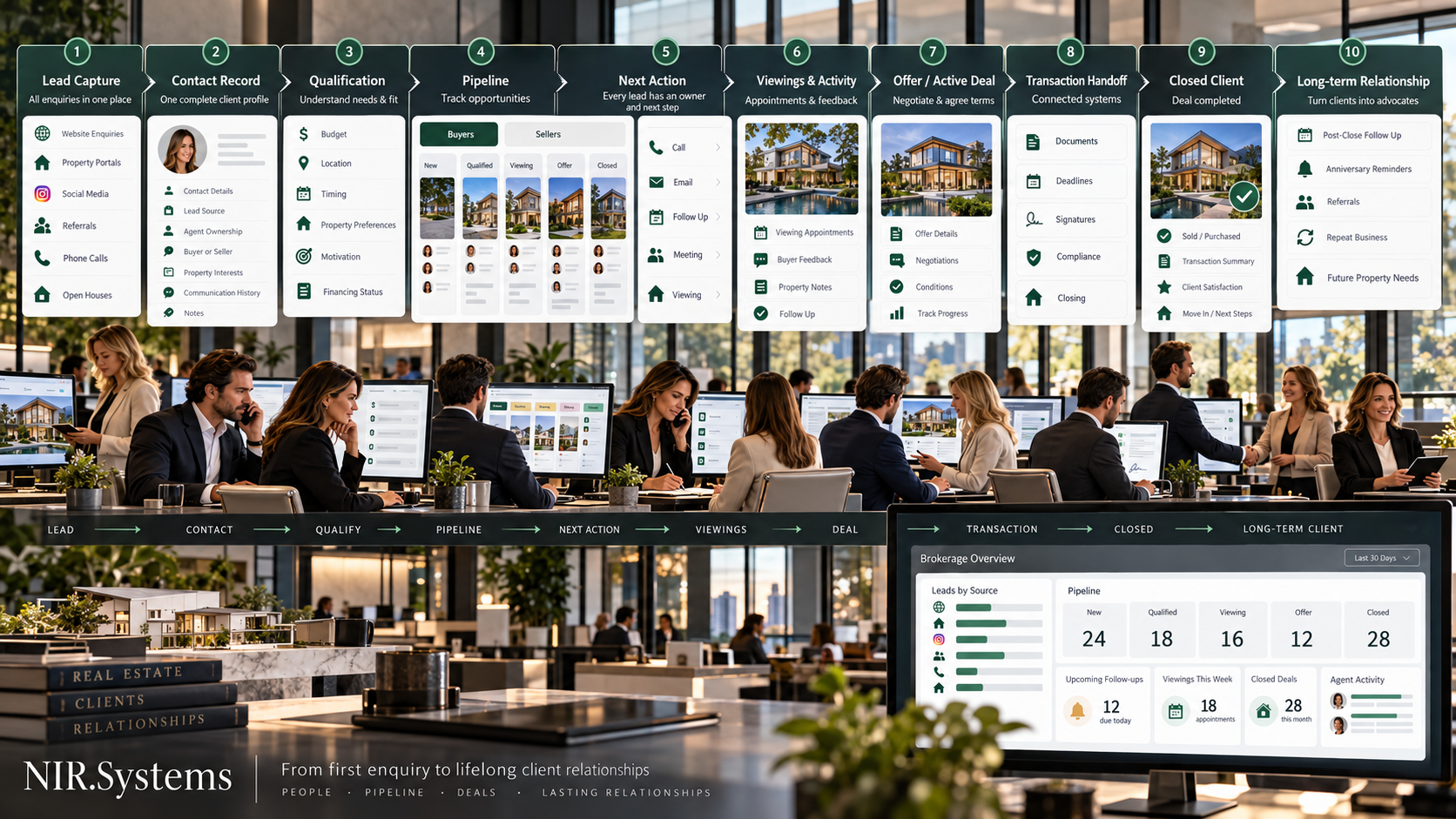
A practical real estate CRM workflow
- Lead enters the system. Source, contact details and enquiry context are captured.
- Ownership is assigned. One agent or team is responsible for the next action.
- Lead is qualified. Buyer or seller needs, timing, location and motivation are structured.
- Pipeline stage is set. The contact appears in the correct buyer or seller workflow.
- Next action is scheduled. Every active opportunity has a date and owner.
- Viewings, meetings and offers are logged. Activity stays connected to the relationship.
- Active transaction is handed into the appropriate deal-management process.
- Closed client becomes a relationship, not an archive. The CRM creates a future follow-up path for referrals, repeat business and long-term service.
No active lead should exist without an owner, a stage and a next action. If your CRM cannot make those three things obvious, adding more features will not solve the underlying problem.
Real estate CRM buyer checklist
What a focused CRM should avoid
More features do not automatically produce a better system. Warning signs include:
- dozens of mandatory fields agents will never complete,
- pipelines that do not match the brokerage’s actual process,
- too many automated messages,
- duplicate contact records from multiple lead sources,
- reports built around vanity metrics,
- mobile workflows that are slower than taking a note, and
- important data trapped in a system that is difficult to export.
The best CRM is not the one with the longest feature list. It is the one the team uses consistently enough to create reliable operational data.
Where NIR.Systems Real Estate CRM fits
NIR.Systems offers a Real Estate CRM built specifically for real estate agencies. The current product is centered on buyer and seller leads, properties, viewings, offers, sales pipeline and commissions, with a live interactive demo available on the product page.
The standard build starts from $599, with a $199 deposit to begin the project review. Branding and setup are included at the starting level, while additional features or integrations are scoped before build. The final system uses the customer’s own brand and data.
The important point is that the CRM remains an operational system rather than a generic database. It can also sit alongside specialist tools such as Real Estate AI, keeping relationship and pipeline data structured while AI assists with research, summaries or drafts around that workflow.
Frequently asked questions
What is a real estate CRM?
It is software that centralizes contacts, leads, relationship history, follow-up tasks, property interests and pipeline stages so agents and teams can manage buyers, sellers and referral relationships consistently.
What should a real estate CRM include?
At minimum: lead capture, contact records, source tracking, pipeline stages, tasks and reminders, communication history, property preferences, viewing and offer tracking, team assignment, reporting, mobile access and appropriate integrations.
Is a CRM the same as transaction management software?
No. CRM focuses on relationships, pipeline and follow-up. Transaction management focuses more heavily on documents, milestones, signatures, compliance and coordination during an active deal.
Does a small real estate team need a CRM?
A small team can benefit once leads, follow-ups and relationship history become difficult to manage reliably across individual inboxes, calendars and spreadsheets. The system should remain simple enough that agents actually use it.
Sources and further reading
- National Association of REALTORS® — 2026 Technology Report findings
- NAR REALTOR® News — The Tech Real Estate Agents Rely on Most in 2026
- NAR REALTOR® News — Using brokerage client and transaction data
- Follow Up Boss — Real estate lead routing workflow
See the workflow before you buy it.
Explore the live Real Estate CRM demo, review the dashboard, pipeline and property workflow, then have the system built with your own branding and data.